Download Instagram photos in HD quality
Instagram Photo Downloader: Download photos from Instagram for free
Free Instagram photo downloader
Every day, millions of new photos are shared on Instagram, from everyday moments, personal style, to unique creative ideas. These images are not only a way to connect but also an endless source of inspiration for life and work.
Are you looking to download these favorite photos to your device? Story-Saver is the perfect tool to help you download Instagram photos quickly and easily. With Story-Saver, you can download photos from Instagram in just a few simple steps without registering an account, supporting all devices from mobile phones, tablets, to PCs and Macs.
How to download photos from Instagram with Story-Saver
- On Instagram, copy the post link with the photo you want to download.
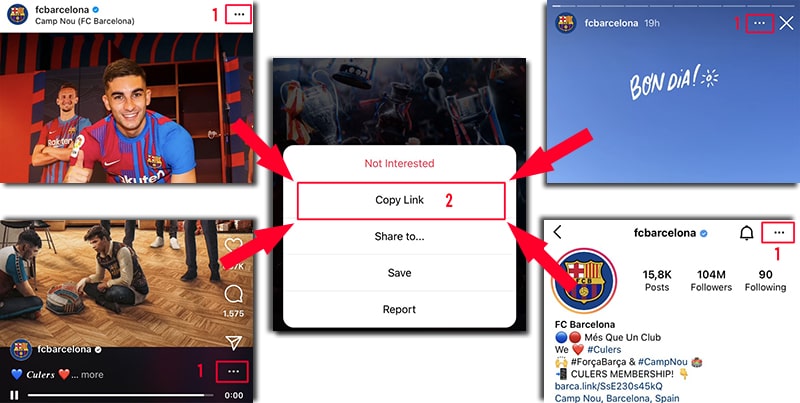
- Visit the Instagram photo download website using a web browser.
- Paste the copied Instagram link into the input field on Story-Saver and press the Download button.
- Choose the right photo size then save it to your device and enjoy it.
Download Instagram photos easily on any device
With Story-Saver, you can download photos from Instagram on any device:
Smartphone: iPhone or Android.
Tablet: iPad and Android devices.
Computer: PC or Mac.
No need to install an application, just a web browser, Story-Saver will help you save photos quickly without any problems.
Story-Saver.to is the ideal tool to help you preserve memorable moments from Instagram. Try it today and enjoy the convenience we bring!